- Full documentation, guide and tutorial
- Learning the Woovebox
- The very basics
- Quick start tutorial
- Tempo and BPM
- Tracks
- Patterns
- Live pattern recording
- Conditional triggering and modification
- Chords
- Arpeggios
- Scales and modes
- Genres
- Patches and Presets
- Sound design
- DNA dynamic patch cross-breeding
- Paraphonic parts
- Multi-instrument mode
- Risers, fallers, sweeps & ear candy
- Live mode
- Song mode
- Full song writing
- Sampler & vocoder
- Mixing & Mastering
- Lo-fi & vintage analog and digital emulation
- Randomization
- Hall effect sensor playing
- Advanced techniques
- Undo
- Boot modes
- Connecting other gear; MIDI, Sync, and audio pass-through
- Remote control expander mode
- Wireless MIDI over Bluetooth
- Connecting Bluetooth typing keyboard/touchpad
- Battery and charging
- Hardware quirks and limitations
- Understanding DSP load
- Looking after your Woovebox
- Firmware updates
- The very basics
- Changing a setting or parameter
Changing a setting or parameter
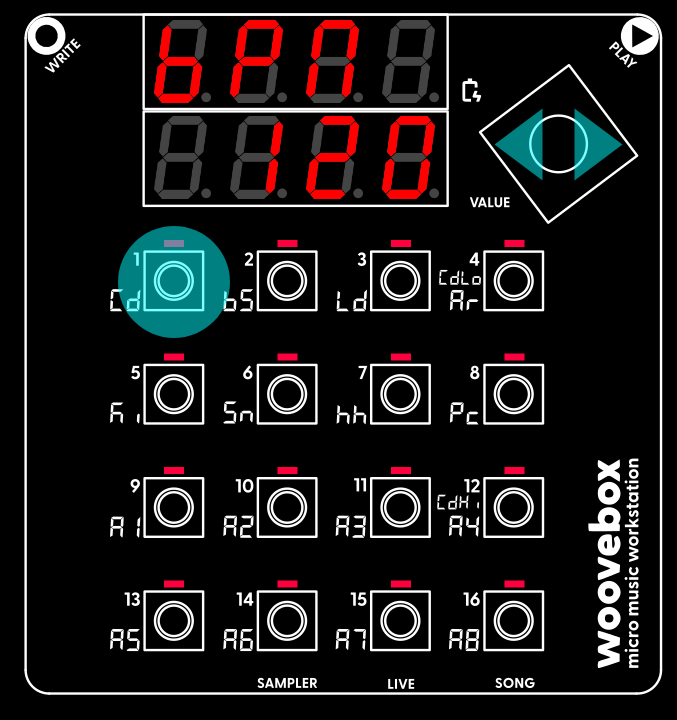
Your Woovebox is a deeply powerful device with many settings, controls and parameters for you to tweak.
Each 1-16 key corresponds to one of sixteen parameters, controls or settings. As such, you can access up to sixteen parameters, controls or settings at once (e.g. per page).
The nature and amount of parameters accessible to you, depend on the mode (Track, Sampler, Live, Song) and the selected page ("GLob", "Osc1", "Osc2", etc.). For example, a track's "GLob" (for Global) page gives you access to 16 parameters, all pertaining to the currently selected track.
Not all pages have 16 parameters; on most pages, a 1-16 key that has an accessible parameter underneath, has its corresponding LED lit up.
- To learn the current value of a setting, control or parameter, simply perform a short-press on 1-16. For example, while in Song mode and on the "GLob" page, pressing 1/Cd will show you the current tempo in Beats Per Minute (BPM).
- To get a longer eight-character description of the parameter, perform a long-press on 1-16.
- To change a parameter or setting, hold down 1-16 and turn the Value knob left or right.
In most modes and on most mode pages, short-pressing 1-16 will also audition the currently active track as soon as you let go of 1-16. This will quickly help you determine how your parameter tweak may have changed the sound. If this is undesirable, perform a long-press on 1-16, waiting until the eight-character description comes up. Then tweak your parameter after the eight-character description has come up, to avoid auditioning the sound.
Fast value changes
Besides turning the knob faster, while holding a 1-16 key, you can also quickly change values by;
- Pressing the value knob in then turning it (with the knob still pressed in). This changes the parameter in big 10% steps.
or;
- Short pressing the value knob (short press, e.g. press and release <1 sec). This toggles between minimum, middle and maximum values for the parameter.
For completeness sake, it is worth mentioning that accidental (or deliberate) long (e.g. press and release >1 sec) presses of the value knob will also work, provided;
- you have already changed the parameter at least once since holding the 1-16 key.
or
- once the 8-character parameter description has displayed (~1 second)
If these conditions are not met, the unit will proceed with a regular long-press track or mode change (or solo/unsolo).
You may also be interested in...
- Glob (song globals) page (under Song-wide settings)
- Song Mode (under Cheat sheet)
Use Fragment (mutes/unmutes/solos) in Sequencer / Track Edit mode.
- 16. rv.Md Reverb Modulation (under FX (global multi-effects))
Modulates and offsets the delay lines to simulate moving/turbulent air.
- Arranging techniques and tips (under Fragments; arranging and building your song)
The Woovebox' powerful conditional triggering already tends to make sure that changes take place regularly.
- 5. FEG.d Filter Amplitude Generator depth (under Filter page)
A negative value defines an exponential response (power of two), while a non-negative value defines a linear response.
- Full documentation, guide and tutorial
- Learning the Woovebox
- The very basics
- Quick start tutorial
- Tempo and BPM
- Tracks
- Patterns
- Live pattern recording
- Conditional triggering and modification
- Chords
- Arpeggios
- Scales and modes
- Genres
- Patches and Presets
- Sound design
- DNA dynamic patch cross-breeding
- Paraphonic parts
- Multi-instrument mode
- Risers, fallers, sweeps & ear candy
- Live mode
- Song mode
- Full song writing
- Sampler & vocoder
- Mixing & Mastering
- Lo-fi & vintage analog and digital emulation
- Randomization
- Hall effect sensor playing
- Advanced techniques
- Undo
- Boot modes
- Connecting other gear; MIDI, Sync, and audio pass-through
- Remote control expander mode
- Wireless MIDI over Bluetooth
- Connecting Bluetooth typing keyboard/touchpad
- Battery and charging
- Hardware quirks and limitations
- Understanding DSP load
- Looking after your Woovebox
- Firmware updates