- Full documentation, guide and tutorial
- Learning the Woovebox
- The very basics
- Quick start tutorial
- Tempo and BPM
- Tracks
- Patterns
- Live pattern recording
- Conditional triggering and modification
- Chords
- Arpeggios
- Scales and modes
- Genres
- Patches and Presets
- Sound design
- DNA dynamic patch cross-breeding
- Paraphonic parts
- Multi-instrument mode
- Risers, fallers, sweeps & ear candy
- Live mode
- Song mode
- Full song writing
- Sampler & vocoder
- Mixing & Mastering
- Lo-fi & vintage analog and digital emulation
- Randomization
- Hall effect sensor playing
- Advanced techniques
- Undo
- Boot modes
- Connecting other gear; MIDI, Sync, and audio pass-through
- Remote control expander mode
- Wireless MIDI over Bluetooth
- Connecting Bluetooth typing keyboard/touchpad
- Battery and charging
- Hardware quirks and limitations
- Understanding DSP load
- Looking after your Woovebox
- Firmware updates
- Connecting Bluetooth typing keyboard/touchpad
- Caps Lock Modes
Caps Lock Modes
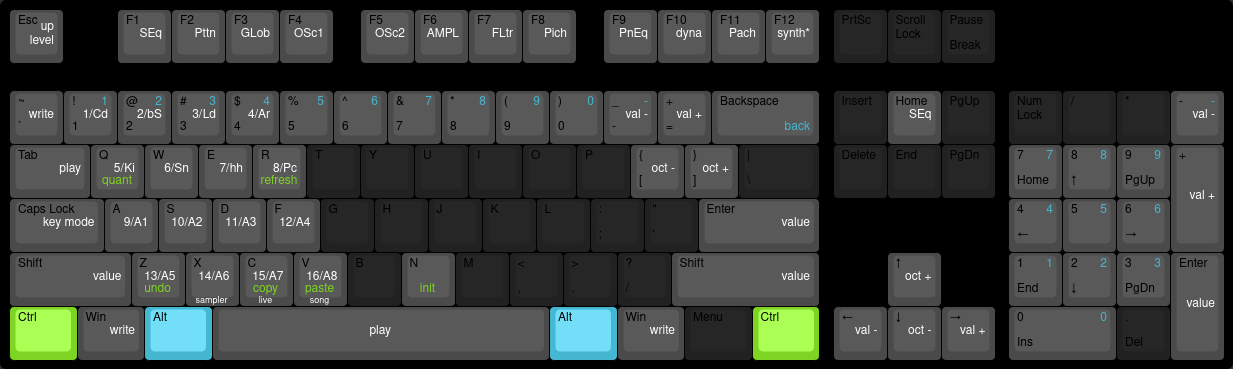
Normal mode controls your Woovebox as you are used to, however with some handy shortcuts to speed up your workflow.
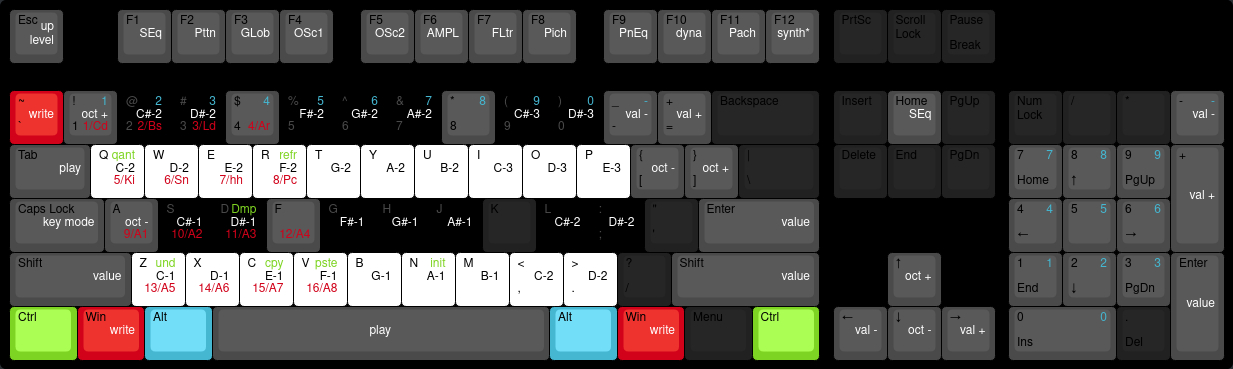
Performance mode turns your keyboard in a tracker-style musical keyboard and allows for quick note and chord programming.
Normal Mode (Caps Lock Off)
1/Cd - 4/Ar
1 - 4
5/Ki - 8/Pc
Q - R
9/A1 - 12/A4
A - F
13/A5 - 16/A8
Z - V
Write
~
Windows Key
Mouse Left-click
Play
Tab
Spacebar
Mouse Right-click
Value Push-in
Shift
Enter
D-Pad OK
Value Left/Right
Cursor Left/Right
Mousepad Left/Right Swipe
Mouse Scroll Wheel Down/Up
D-Pad Left/Right
Previous Track/Next Track
+/-
Octave Up/Down
Cursor Up/Down
D-Pad Up/Down
[/]
Track Editing Sequencer Page
F1
ESC/Home/Back (from any other track page other than SEQ page)
Track Editing Page GLob - Pach
F2-F11
Track Editing Synth Specific (e.g. Wavetable)
F12
Song Mode
ESC/Home/Back (from SEQ page)
Copy Pattern or Patch
CTRL+C
Copy Key
Paste Pattern or Patch
CTRL+V
Paste Key
Initialize Pattern or Patch
CTRL+N
Quantize Pattern or Pattern Chain
CTRL+Q
Refresh / Reload / Randomize Pattern or Patch
CTRL+R
Increase/Decrease Volume
Volume -/+ Keys
Performance Mode (Caps Lock On)
Upper octave
Q-P (with numeric keys acting as black keys)
Lower octave
Z-Period('.')
Octave Up/Down
1/A
Write
~ (temporarily cancels Caps Lock mode for the duration of this key being pressed down)
Windows Key (temporarily cancels Caps Lock mode for the duration of this key being pressed down)
You may also be interested in...
- Important notes (under Shop)
- 8. C2EF Filter to effects (under Filter page)
- Pitch modulation (under Sound design)
Pitch modulation and modification plays an important role in the Woovebox' sound synthesis engine.
- "What Is Love" (remake) song SYX (under Download 3.0 example songs and patches .SYX)
The track makes liberal use of overlapping notes + legato for the voice line approximations.
- 16. L.C.ho hold duration for cutoff frequency LFO (under Filter page)
Specifies the hold duration in milliseconds for which the LFO should hold the LFO's sampled value.
- Full documentation, guide and tutorial
- Learning the Woovebox
- The very basics
- Quick start tutorial
- Tempo and BPM
- Tracks
- Patterns
- Live pattern recording
- Conditional triggering and modification
- Chords
- Arpeggios
- Scales and modes
- Genres
- Patches and Presets
- Sound design
- DNA dynamic patch cross-breeding
- Paraphonic parts
- Multi-instrument mode
- Risers, fallers, sweeps & ear candy
- Live mode
- Song mode
- Full song writing
- Sampler & vocoder
- Mixing & Mastering
- Lo-fi & vintage analog and digital emulation
- Randomization
- Hall effect sensor playing
- Advanced techniques
- Undo
- Boot modes
- Connecting other gear; MIDI, Sync, and audio pass-through
- Remote control expander mode
- Wireless MIDI over Bluetooth
- Connecting Bluetooth typing keyboard/touchpad
- Battery and charging
- Hardware quirks and limitations
- Understanding DSP load
- Looking after your Woovebox
- Firmware updates