- Full documentation, guide and tutorial
- Learning the Woovebox
- The very basics
- Quick start tutorial
- Tempo and BPM
- Tracks
- Patterns
- Live pattern recording
- Conditional triggering and modification
- Chords
- Arpeggios
- Scales and modes
- Genres
- Patches and Presets
- Sound design
- DNA dynamic patch cross-breeding
- Paraphonic parts
- Multi-instrument mode
- Risers, fallers, sweeps & ear candy
- Live mode
- Song mode
- Full song writing
- Sampler & vocoder
- Mixing & Mastering
- Lo-fi & vintage analog and digital emulation
- Randomization
- Hall effect sensor playing
- Advanced techniques
- Undo
- Boot modes
- Connecting other gear; MIDI, Sync, and audio pass-through
- Remote control expander mode
- Wireless MIDI over Bluetooth
- Connecting Bluetooth typing keyboard/touchpad
- Battery and charging
- Hardware quirks and limitations
- Understanding DSP load
- Looking after your Woovebox
- Firmware updates
- Full documentation, guide and tutorial
- DNA dynamic patch cross-breeding
DNA dynamic patch cross-breeding & generative synthesis
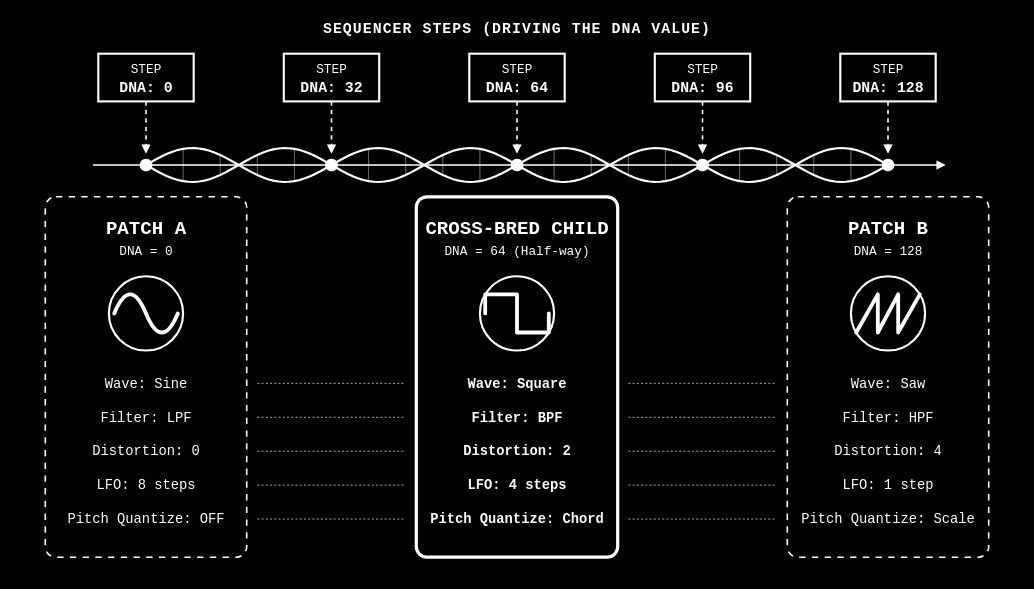
When two synth patches love each other very much...
The Woovebox DNA feature can be thought of as 32-instrument timbrality with an extremely powerful (helical) twist. At its most basic level, it allows you to define and use two patches per track, providing you with 32 instruments per song. But that's just the beginning...
By specifying a "DNA" value (0-128) for a step, you can not only select between the two patches (0 for patch A and 128 for patch B), you can also specify in-between values.
In-between values create "child" patches from the two A and B parents. At its most tame, this allows you to gradually interpolate between two similar - but different - versions of the same patch. For example, one with a extreme distortion and deep reverb and one without. A DNA value of 64 would yield the perfect half-way point.
At its most extreme however, the DNA feature allows you to "cross-breed" wildly different patches patches for some serious timbre-bending results. This is made possible by the Woovebox' unique monolithic synth engine that ensures that all patches share the same "DNA". Therefore, it is possible to take elements from two patches and combine them, where the result is almost always a usable sound that can sound related to its "parent" patches, or can be completely novel.
The sequencer becomes the sound design tool
By exposing this parameter interpolation to the step sequencer, the Woovebox allows the sequencer to become a primary sound design tool;
- Macro-Evolutions (up/down modifiers); Using the dnA.O / dnA.C fragment behaviors, or the pattern-level up, down, or up/down modifiers tied to pattern repeat, allows for massive, song-level transitions. You can start a 64-bar passage with a clean, plucky bass (Patch A) and have it autonomously mutate into a distorted, sustained Reese bass (Patch B) by the end of the chain, without touching a knob. Similarly, you can automate a dry reverb (Patch A) and a wet reverb (Patch B) version of a patch. It is very useful for dramatic build-ups as found in some genres like Trance.
- Generative IDM and Glitch (Rand modifier); Assigning Rand to the DNA value on a 16-step sequence will force the synth to adopt a different hybrid state on every single trig. Because both extremes are rooted in the same "parent" patches, the result will sound cohesive but highly unpredictable—perfect for complex IDM percussion or generative sounds and melodies. Consider using this in conjunction with the "takes" mechanic that allows for "locked-in"/reproducible random sequences.
- Micro-Expressivity; For subtle changes, setting the DNA value to something like 10 or 20 per step allows for slight humanization, slightly altering the decay or filter cutoff without needing to program complex LFOs. It makes patches sound more organic and humanized rather than rigidly synthesized.
- Call and Response; Flipping between two patches can yield interesting call and response parts.
- Switching between sample kits on the same track; making Patch A use US.01 and Patch B use US.16, intermediate sample kits can be chosen.
In short, DNA dynamic cross-breeding can take your tracks to the next level by letting you change up and mutate your timbres on a per-step, per-pattern and/or per-fragment basis; the sequencer and arranger becomes part of the synthesizer.
Note that the DNA feature is not the same as simple "morphing" (aka "scenes") between two patches, found on other synths going as far back as the 1980s. Even "discrete" parameters such as wave form selection or on/off switches too get "interpolated" (toggled or switched over) for - if you want - intentionally wild results. Hitting the threshold where a filter type suddenly flips from Low Pass to Band Pass will create intentional, rhythmic "glitches" and stepped changes. Waveforms, filter types, LFOs, pitch quantization settings; anything is fair game. Every 0..128 DNA value has the potential to be its own unique patch, but always "in between" the two parent patches.
Using DNA mode
While in sequencer or track editing mode, to access the secondary patch/"parent", push down the value knob and turn it to the right. Switching back to the the regular patch can be done manually (push in value and turn left), or happens when switching tracks or modes.
You will see the track indicator and pattern number flip (for example where you would normally see "01.bS" you will now see "bS.01"), letting you know you're in "mirror"/"alter-ego" world for the current track ("Patch B mode"). You can now make modifications to the secondary patch ("Patch B"). For example, you can go to the "Pach" page and load a new preset, or randomize a patch. This new patch and any modifications will exist independent of the regular patch.
Only the following parameters are shared between the two parent patches;
- Global volume
- MIDI Channel
- Follow Chord
- Swing
- Transpose
- Chord Bass Note Transpose
- Multi-instrument mode
TIP: to quickly create variations based on any patch (for example a patch you copied from the primary / 0 DNA patch into the secondary / 128 DNA patch), on the patch ('pach') page, find the 'rand' context menu, then turn the value knob to find and action the 'vari' sub-item. These patch variations tend to be great candidates to "DNA" between.
In this mirror/alter ego "Patch B" mode (with track indicator and pattern number flipped), you will find that you have an extra option when editing steps ("dnA"). To streamline non-DNA workflows, this option only appears in "regular" mode if a pattern or pattern chain has a non-0 DNA value set anywhere for any step. Else, this option will not appear. However, in "mirror"/"alter-ego" world, this option is always available.
Furthermore, in Patch B mode, any step you program will start at DNA value 128 (100% Patch B), rather DNA value 0 (100% Patch A).
Lastly, randomizing a pattern through the "rand Pttn" or "rand Chn" context menu options will also produce randomized DNA values if you are in Patch B mode. In Patch A mode, all randomized steps will have a DNA value of 0. So if you wish to quickly generate a random DNA sequence, make sure you are in Patch B mode when using the pattern randomizer.
Please note that the DNA feature is currently not supported for tracks in multi-instrument mode.
When a DNA change is triggered during playback
1. A full DNA change is triggered when a the sequencer starts playing a note.
2. A limited DNA change is triggered when a DNA change is made to a playing note via legato; only envelope generator and LFO settings are changed.
Automated DNA Modulation per pattern
If you do not need granular control over precise DNA values for each step, you can have the sequencer automate changes to DNA values.
When specifying a DNA value (0..128) of a step, four special values beyond 128 exist;
- Rand; the DNA value assumes a random value for each step.
- Up; the DNA value increases proportionally from the start (DNA = 0) until a specified number of steps have been played (12/A4/dnA.L/'DNA Length' on the 'Pttn' page), always ending at DNA = 128 for the last step.
- Down; the DNA value decreases proportionally from the start (DNA = 128) until a specified number of steps have been played (12/A4/dnA.L/'DNA Length' on the 'Pttn' page), always ending at DNA = 0 for the last step.
- Up/Down; the DNA value increases proportionally from the start (DNA = 0) until half the specified number of steps have been played (12/A4/dnA.L/'DNA Length' on the 'Pttn' page). At half way point the DNA value equals 128, it then decreases the DNA value again, always ending at DNA = 0, completing the cycle.
TIP: To quickly select all steps in a pattern use the "select same" (or its "select all" sub-option) context menu option, which selects all the steps that have the same attribute you last edited (for example if you edited a step with DNA 0 last, all steps with DNA 0 will be selected).
Specifying DNA cycles lengths (12/A4/dnA.L/'DNA Length' on the 'Pttn' page), for your pattern that are polymeters vs your pattern length, greatly add to the feeling that the resulting DNA timbres are never the same. For example, assuming your pattern is 16 steps, then try setting your DNA length to prime numbers, such as 15, 17, 19, 23, 29, 31, 37, 31, 43, 47, 53, 59, 61 and so on.
If no DNA length is set ('off'), the Up, Down and Up/Down feature will use the pattern length (2/bS/Pt.Ln on the 'Pttn' page), multiplied by the amount of chain repeats (4/Ar/Ch.rp on the 'Pttn' page), as the length instead.
Finally, a new 'invert DNA' ('i.dnA') conditional is available, which flips/"rotates" a step's DNA value around 64. So, a DNA value of 0 becomes 128 (full secondary patch) and vice-versa, while a DNA of 32 becomes 96, and so on and so forth.
Automated DNA Modulation per fragment
Special fragment DNA behaviors ("dnA.O" and "dnA.C") are available that lets you automate a DNA sweep, just like a fade in/out or filter open/close.
This is especially useful for aforementioned macro-evolutions (song-level transitions, massive trance build-ups, opening up or closing down effects, etc.).
Any programmed DNA in the playing pattern is scaled according to the fragment progression. So if you have an "opening" DNA automation ("dnA.O") fully from 0, and have a step programmed with DNA value 96, then that step will be played with DNA value 0 at the very start of the fragment, played with DNA value 48 in the middle of the fragment and played with DNA value 96 at the end of the fragment.
Up, Down, Up/Down and Random behaviors in your pattern are are also still respected and are similarly gradually "pulled" towards the values as-they-occur-in-the-pattern ("dnA.O") or to 0 ("dnA.C").
TIP: If your song uses a random seed (7/hh/'SEEd' set to a non-0 value), you may even specify "sub-seeds" (called "takes") when programming your song fragments (a fragment's "take" parameter). This ensures that you can, for example, reliably replicate the same random sequence of events for different parts of your song across different tracks (see song mode documentation). Combined with random DNA values, this lets you try out replicable (but random) DNA sequences for your songs.
Quick start/demo 1
- Start a new song
- Switch to the bass track (value + 2/bS)
- Scroll to the pach page, hold 2/bS and find a preset (for example the Smokey bass 'SMoK').
- Press in the value knob and turn it right - you are now editing Patch B.
- Find a preset different from the first one (for example the Holiday bass 'hLdy').
- Return to the 'SEq' page program some notes and multi-select all their steps for editing.
- While having the steps selected, find the 'dnA' step option - they will currently be set to 128 (secondary patch)
- Scroll past 128 to find the 'rand', 'up', 'down' or 'up.dn' options. Select whichever you prefer.
- Press play to hear the track play a different timbre for each programmed step.
- "In-between" timbres will be more exotic/extreme depending on how dissimilar the two presets are that you chose.
- If you chose 'up', 'down or 'up.dn' for any of the steps, on the 'Pttn' page, hold 12/A4/DnA.L/"DNA Length" to specify a length over which the ramping should play out. Choose a multiple of your bass pattern length (e.g. 16, 32, 48, 64 etc if your bass pattern is 16 steps in length) for predictable patterns, or use other lengths to decouple step position from selected timbre.
- Observe, for example, how - in the case of the Holiday and Smokey bass, the ramping cause in between patches to modulate wave type selection as well, resulting in some timbres playing paraphonically as they cycle past the paraphonic oscillator types.
Quick start/demo 2 (fragment)
- Start a new song
- Switch to the bass track (value + 2/bS)
- Scroll to the pach page, hold 2/bS and find a preset (for example the Smokey bass 'SMoK').
- Press in the value knob and turn it right - you are now editing Patch B.
- Find a preset different from the first one (for example the Holiday bass 'hLdy').
- Return to the 'SEq' pag.
- Find the "rand Pttn" context menu item and action it. A random pattern will be created with - as long as you are still in Patch B mode - random DNA values.
- Play the pattern, verifying the pattern is randomized and that you can hear randomized DNA events.
- Next, go into Song mode.
- Create a fragment that plays the pattern we just made on the bS track. Set playback behavior ("bEhv") to dnA.O ("DNA Open") behavior.
- Set the fragment length to something longer (like 8 bars).
- Play back the song. You should hear the fragment start playing with just Patch A, and then get progressively "wilder". Towards the end of the fragment, the playback should match what you heard when playing back the pattern on the "SEq" page in all its random glory.
You may also be interested in...
- Download 3.0 example songs and patches .SYX (under Downloads & Community)
If you'd like to see how some songs or patches are put together, load them up through Wooveconnect.
- 'When' conditions (under Conditional triggering and modification)
'PTh2'; Skip the first playthrough and perform the 'do' modification on the second playthrough, and so on.
- Multi-instrument mode (under Full documentation, guide and tutorial)
To change any bS-A8 track into a multi-channel track, on the GLob page of a track, change the 'bEhv' (under 7/hh) parameter to 'Mu.in'.
- Program a break (under Amen chop tutorial)
Grab (audition) slice 13 and program it on, for example, step 11.
- Step length-based auto-pitch (under Advanced modes and techniques)
- Full documentation, guide and tutorial
- Learning the Woovebox
- The very basics
- Quick start tutorial
- Tempo and BPM
- Tracks
- Patterns
- Live pattern recording
- Conditional triggering and modification
- Chords
- Arpeggios
- Scales and modes
- Genres
- Patches and Presets
- Sound design
- DNA dynamic patch cross-breeding
- Paraphonic parts
- Multi-instrument mode
- Risers, fallers, sweeps & ear candy
- Live mode
- Song mode
- Full song writing
- Sampler & vocoder
- Mixing & Mastering
- Lo-fi & vintage analog and digital emulation
- Randomization
- Hall effect sensor playing
- Advanced techniques
- Undo
- Boot modes
- Connecting other gear; MIDI, Sync, and audio pass-through
- Remote control expander mode
- Wireless MIDI over Bluetooth
- Connecting Bluetooth typing keyboard/touchpad
- Battery and charging
- Hardware quirks and limitations
- Understanding DSP load
- Looking after your Woovebox
- Firmware updates