- Full documentation, guide and tutorial
- Learning the Woovebox
- The very basics
- Quick start tutorial
- Tempo and BPM
- Tracks
- Patterns
- Live pattern recording
- Conditional triggering and modification
- Chords
- Arpeggios
- Scales and modes
- Genres
- Patches and Presets
- Sound design
- DNA dynamic patch cross-breeding
- Paraphonic parts
- Multi-instrument mode
- Risers, fallers, sweeps & ear candy
- Live mode
- Song mode
- Full song writing
- Sampler & vocoder
- Mixing & Mastering
- Lo-fi & vintage analog and digital emulation
- Randomization
- Hall effect sensor playing
- Advanced techniques
- Undo
- Boot modes
- Connecting other gear; MIDI, Sync, and audio pass-through
- Remote control expander mode
- Wireless MIDI over Bluetooth
- Connecting Bluetooth typing keyboard/touchpad
- Battery and charging
- Hardware quirks and limitations
- Understanding DSP load
- Looking after your Woovebox
- Firmware updates
- Quick start tutorial
- Boot up
Boot up
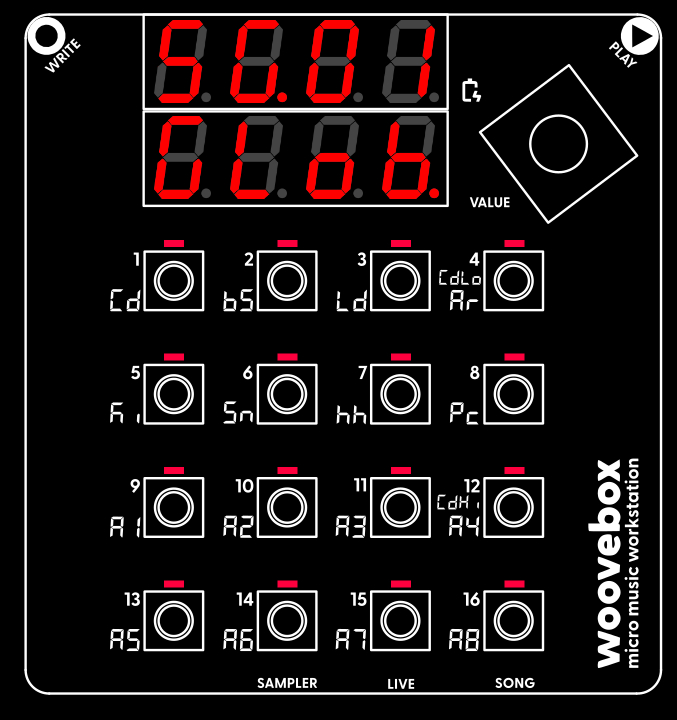
Turn on your Woovebox without touching the write or play touch buttons (as their sensitivity is calibrated during boot).
Once your Woovebox has booted up, you will be dropped into Song ("SG") mode.
The song number you last worked on, is automatically restored ("SG.01" through "SG.16"). The chord (Cd) track will play a chord/chime, to let you know boot up has completed. This chime also gives you an audible identifier of the song that is loaded (as you may recognize the timbre of the instrument).
Note that, when you switch away from Song mode, you can return to Song mode at any time, by holding the value button down and then short-pressing ("short-pressing" meaning, holding down for less than one second) 16/A8/SONG.
If you accidentally scrolled past the "GLob", "MStr" or "FX" pages and the display reads "Fr.xx" (fragment number xx) or "DJ.xx" (DJ FX for fragment xx), you can use the value knob (turn left) to scroll back to the "SG.xx" "GLob"/"MStr"/"FX" pages.
You may also be interested in...
- Model comparison
- 10. dcAy Filter Envelope Generator Decay (under Filter page)
- The Woovebox song writing recipe (under Full song writing)
These individual patterns on individual tracks are then served together as song fragments in Song mode.
- 4. O3.Oc Oscillator 3 Octave (under Pitch page)
Specifies an octave by which the pitch should be lowered or increased, relative to the parent oscillator (as specified by O3.Lv).
- 5. Prt.S Portamento Speed (under Pitch page)
Please note that, in order to enable portamento, both a non-"off" speed and a non-0 probability must be set.
- Full documentation, guide and tutorial
- Learning the Woovebox
- The very basics
- Quick start tutorial
- Tempo and BPM
- Tracks
- Patterns
- Live pattern recording
- Conditional triggering and modification
- Chords
- Arpeggios
- Scales and modes
- Genres
- Patches and Presets
- Sound design
- DNA dynamic patch cross-breeding
- Paraphonic parts
- Multi-instrument mode
- Risers, fallers, sweeps & ear candy
- Live mode
- Song mode
- Full song writing
- Sampler & vocoder
- Mixing & Mastering
- Lo-fi & vintage analog and digital emulation
- Randomization
- Hall effect sensor playing
- Advanced techniques
- Undo
- Boot modes
- Connecting other gear; MIDI, Sync, and audio pass-through
- Remote control expander mode
- Wireless MIDI over Bluetooth
- Connecting Bluetooth typing keyboard/touchpad
- Battery and charging
- Hardware quirks and limitations
- Understanding DSP load
- Looking after your Woovebox
- Firmware updates