- Full documentation, guide and tutorial
- Learning the Woovebox
- The very basics
- Quick start tutorial
- Tempo and BPM
- Tracks
- Patterns
- Live pattern recording
- Conditional triggering and modification
- Chords
- Arpeggios
- Scales and modes
- Genres
- Patches and Presets
- Sound design
- DNA dynamic patch cross-breeding
- Paraphonic parts
- Multi-instrument mode
- Risers, fallers, sweeps & ear candy
- Live mode
- Song mode
- Full song writing
- Sampler & vocoder
- Mixing & Mastering
- Lo-fi & vintage analog and digital emulation
- Randomization
- Hall effect sensor playing
- Advanced techniques
- Undo
- Boot modes
- Connecting other gear; MIDI, Sync, and audio pass-through
- Remote control expander mode
- Wireless MIDI over Bluetooth
- Connecting Bluetooth typing keyboard/touchpad
- Battery and charging
- Hardware quirks and limitations
- Understanding DSP load
- Looking after your Woovebox
- Firmware updates
- Quick start tutorial
- Build up more elements
Build up more elements
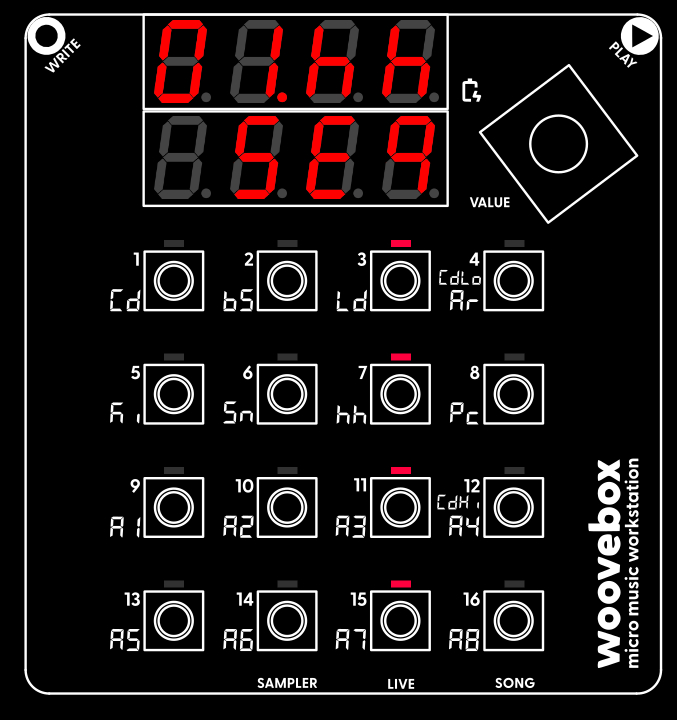
Hi-hats (track 7/hh) on the off-beat (steps 3, 7, 11, 15).
Now that you have familiarized with programming notes and patterns, you can start adding more elements using the other tracks.
For example, put a hi-hat (7/hh) on the off-beat (steps 3, 7, 11, 15), and add a snare (6/Sn) and/or clap (9/A1) on steps 5 and 13.
You may also be interested in...
- Free Beat: "Ultimate Budget Groovebox?" (under Reviews, videos, tutorials)
This is Free Beat's thorough launch day (2023-09-01) review of the Woovebox.
- 3. Eq.Hi EQ High Frequency Shaping (under Panning & EQ page)
Tone shapes everything above the specified EQ's mid point frequency (4/Ar/Eq.Fr) multiplied by two.
- Amplitude modulation (under Sound design)
- Pitch page (under Pitch modulation)
- Dynamics ('dyna') page (under Dynamics, Sidechaining, Gating, Ducking, Compression and Transient Shaping)
- Full documentation, guide and tutorial
- Learning the Woovebox
- The very basics
- Quick start tutorial
- Tempo and BPM
- Tracks
- Patterns
- Live pattern recording
- Conditional triggering and modification
- Chords
- Arpeggios
- Scales and modes
- Genres
- Patches and Presets
- Sound design
- DNA dynamic patch cross-breeding
- Paraphonic parts
- Multi-instrument mode
- Risers, fallers, sweeps & ear candy
- Live mode
- Song mode
- Full song writing
- Sampler & vocoder
- Mixing & Mastering
- Lo-fi & vintage analog and digital emulation
- Randomization
- Hall effect sensor playing
- Advanced techniques
- Undo
- Boot modes
- Connecting other gear; MIDI, Sync, and audio pass-through
- Remote control expander mode
- Wireless MIDI over Bluetooth
- Connecting Bluetooth typing keyboard/touchpad
- Battery and charging
- Hardware quirks and limitations
- Understanding DSP load
- Looking after your Woovebox
- Firmware updates