- Full documentation, guide and tutorial
- Learning the Woovebox
- The very basics
- Quick start tutorial
- Tempo and BPM
- Tracks
- Patterns
- Live pattern recording
- Conditional triggering and modification
- Chords
- Arpeggios
- Scales and modes
- Genres
- Patches and Presets
- Sound design
- DNA dynamic patch cross-breeding
- Paraphonic parts
- Multi-instrument mode
- Risers, fallers, sweeps & ear candy
- Live mode
- Song mode
- Full song writing
- Sampler & vocoder
- Mixing & Mastering
- Lo-fi & vintage analog and digital emulation
- Randomization
- Hall effect sensor playing
- Advanced techniques
- Undo
- Boot modes
- Connecting other gear; MIDI, Sync, and audio pass-through
- Remote control expander mode
- Wireless MIDI over Bluetooth
- Connecting Bluetooth typing keyboard/touchpad
- Battery and charging
- Hardware quirks and limitations
- Understanding DSP load
- Looking after your Woovebox
- Firmware updates
- The very basics
- Workflow and Song Mode
Workflow and Song Mode
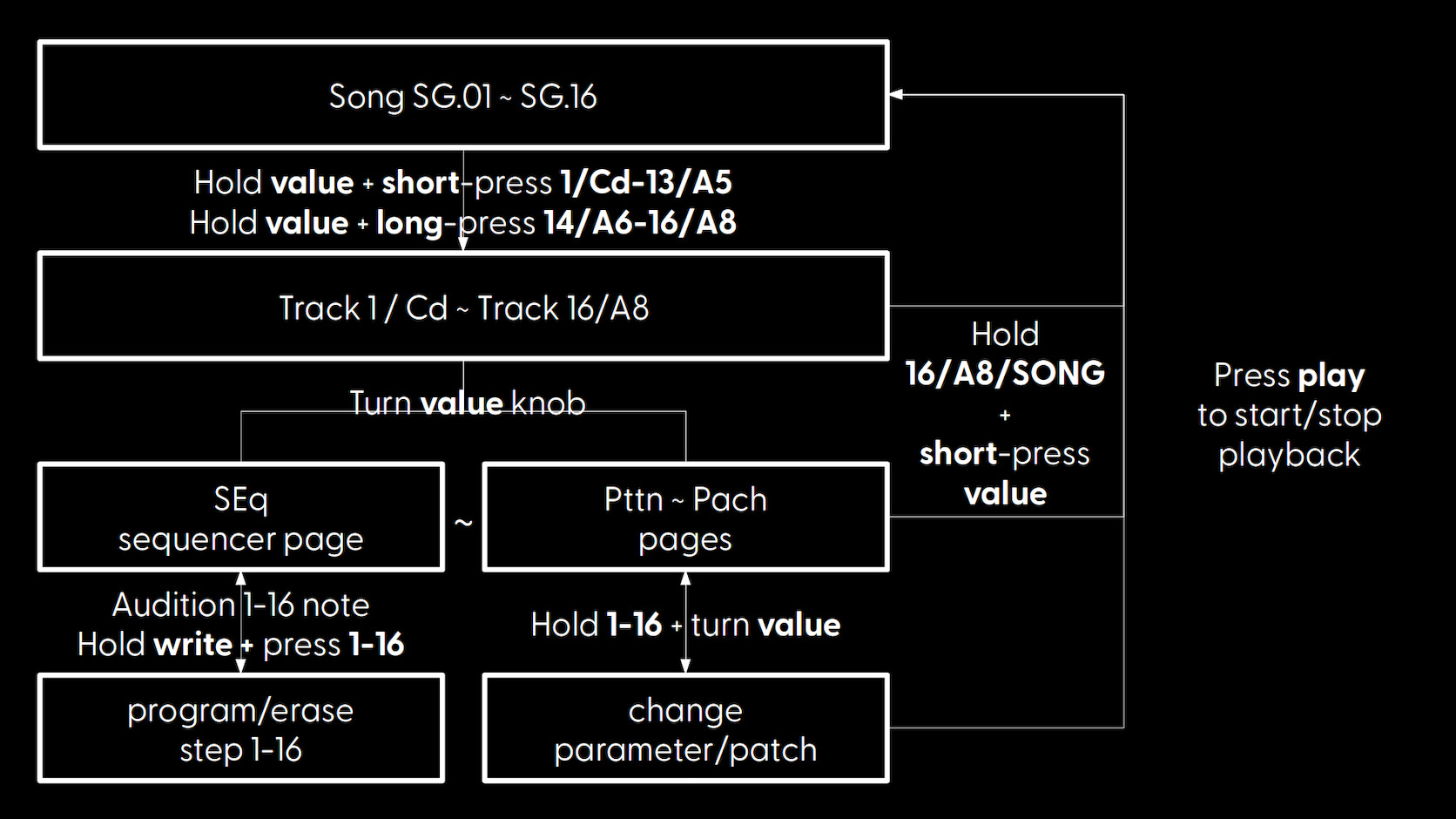
Generally, a workflow will look like;
- Select a song to work on
- Select a track to work on
- (optional) Select the track's pattern to work on
- Record/program and edit notes on steps
- Audition your track's pattern, in the context of other patterns, in the context of your song (in song mode) or in the context of a live performance (in live mode)
- Go to 2
Once you are happy with a couple of individual patterns on their individual tracks, you should ideally move to creating full songs out of them as soon as possible. This is done by creating mixing and matching track patterns in song "fragments" in song mode (alternatively you can create "scenes" out of them in live mode for live performances). Getting to grips with Song mode in particular, is key to getting the most out of your Woovebox.
Finally, you can export any songs (but not individual patterns) you made as .WAV audio files and .MID MIDI files via Wooveconnect.
Refer to the quick start tutorial for a super quick introduction to making your first song. Again, even if you are intimately familiar with grooveboxes already, it is highly recommended to go through the tutorial at least once.
You may also be interested in...
- Mixing & Mastering (under Full documentation, guide and tutorial)
per-track side-chaining to control the volume of other tracks or respond to the volume of other tracks.
- Pairing your Woovebox to a host (under Wireless MIDI over Bluetooth)
Please make sure any Battery Saver mode that may interfere with Bluetooth is off (Android, iOS, and Windows Power Management).
- Boot up (under Quick start tutorial)
Once your Woovebox has booted up, you will be dropped into Song ("SG") mode.
- Fragment DJ FX Mode (under Fragments; arranging and building your song)
Fragment DJ mode is an alternative view of a programmed fragment.
- Method 2 (under Arpeggios)
If a sine wave is configured for the Pitch LFO with a depth of 2.0, the pitch will sweep the chord's note over two octaves.
- Full documentation, guide and tutorial
- Learning the Woovebox
- The very basics
- Quick start tutorial
- Tempo and BPM
- Tracks
- Patterns
- Live pattern recording
- Conditional triggering and modification
- Chords
- Arpeggios
- Scales and modes
- Genres
- Patches and Presets
- Sound design
- DNA dynamic patch cross-breeding
- Paraphonic parts
- Multi-instrument mode
- Risers, fallers, sweeps & ear candy
- Live mode
- Song mode
- Full song writing
- Sampler & vocoder
- Mixing & Mastering
- Lo-fi & vintage analog and digital emulation
- Randomization
- Hall effect sensor playing
- Advanced techniques
- Undo
- Boot modes
- Connecting other gear; MIDI, Sync, and audio pass-through
- Remote control expander mode
- Wireless MIDI over Bluetooth
- Connecting Bluetooth typing keyboard/touchpad
- Battery and charging
- Hardware quirks and limitations
- Understanding DSP load
- Looking after your Woovebox
- Firmware updates