- Full documentation, guide and tutorial
- Learning the Woovebox
- The very basics
- Quick start tutorial
- Tempo and BPM
- Tracks
- Patterns
- Live pattern recording
- Conditional triggering and modification
- Chords
- Arpeggios
- Scales and modes
- Genres
- Patches and Presets
- Sound design
- DNA dynamic patch cross-breeding
- Paraphonic parts
- Multi-instrument mode
- Risers, fallers, sweeps & ear candy
- Live mode
- Song mode
- Full song writing
- Sampler & vocoder
- Mixing & Mastering
- Lo-fi & vintage analog and digital emulation
- Randomization
- Hall effect sensor playing
- Advanced techniques
- Undo
- Boot modes
- Connecting other gear; MIDI, Sync, and audio pass-through
- Remote control expander mode
- Wireless MIDI over Bluetooth
- Connecting Bluetooth typing keyboard/touchpad
- Battery and charging
- Hardware quirks and limitations
- Understanding DSP load
- Looking after your Woovebox
- Firmware updates
- Learning the Woovebox
- General advice
General advice
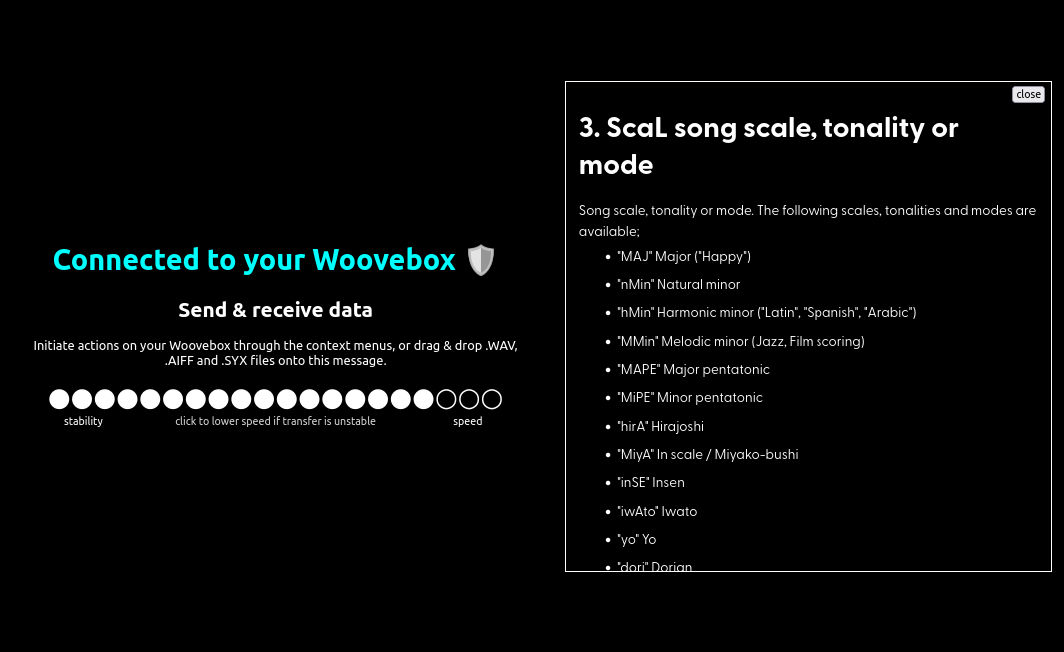
Automatically call up documentation via Wooveconnect 2
With your Woovebox connected to Wooveconnect, a long-press on a parameter will not only provide an 8-character description on the LED display, but will also call up the full website documentation for that parameter. Your screen or device must be in landscape mode.
Song mode
As opposed to many other grooveboxes, Song mode is not an afterthought. In fact, almost everything about the Woovebox workflow and sound design, is about functioning as build blocks for a song.
As such, getting to the point where you can use Song mode effectively is key to get the most out of your Woovebox. If full song creation sounds daunting, there is a song writing guide/recipe here.
Approach the Woovebox as an "ears-first" device
Visual feedback in the interface is there only for things that absolutely need it. The rest of ithe interface is centered around working with your ears, rather than with your eyes.
Never stop learning
Music and sound design are open-ended topics. No matter how far along you are in your journey, there are always new things to discover; new sounds, new techniques, new genres. Your Woovebox is a open-ended tool to help you discover and explore these, rather than confining you to one specific use-case, genre, instrument or function.
Tweak the presets
Before resorting to, for example, the vast Teenage Engineering OP-1 / OP-Z sample library, delving into the Woovebox' synthesis engine is highly recommended. Even if you're not experimentally inclined, or are simply not interested in synthesis, try tweaking the presets, or use the patch randomization function to find a unique sound.
It's the gateway to making a track "your own" and developing your own style and sound. Your Woovebox can perform in virtually all genres of music. If you do decide to use samples however, then learn how to use them as a basis of your own sounds (rather than using them as-is). The ways samples can be used and transformed on the Woovebox are - again - vast.
Getting to the point where you can use Song mode effectively is key to get the most out of your Woovebox.
Mastering
Your Woovebox comes with all tools needed to accomplish a professional mastered song.
Enjoy your time with the Woovebox
Most of all, enjoy your time with the Woovebox! A learning curve is expected, but it will get easier and things will click (particularly once you understand Song mode and how it is made to transform patterns). If there are any roadblocks to your enjoyment, a friendly community on Discord or Reddit is here to help you.
You may also be interested in...
- Launch Wooveconnect
Manage songs, samples, audio stems, firmware updates and more through Wooveconnect.
- Reverb (under Global Send Multi-effects)
This ensures a sound playing on a track is not drowned out by its own reverb.
- Scenes (under Live mode)
Programming a scene is nearly identical to programming a song fragment in Song mode.
- Understanding DSP load (under Full documentation, guide and tutorial)
To use more tracks simultaneously however, it is important to understand DSP resource management.
- With conditional triggering and modification (under Example)
- Full documentation, guide and tutorial
- Learning the Woovebox
- The very basics
- Quick start tutorial
- Tempo and BPM
- Tracks
- Patterns
- Live pattern recording
- Conditional triggering and modification
- Chords
- Arpeggios
- Scales and modes
- Genres
- Patches and Presets
- Sound design
- DNA dynamic patch cross-breeding
- Paraphonic parts
- Multi-instrument mode
- Risers, fallers, sweeps & ear candy
- Live mode
- Song mode
- Full song writing
- Sampler & vocoder
- Mixing & Mastering
- Lo-fi & vintage analog and digital emulation
- Randomization
- Hall effect sensor playing
- Advanced techniques
- Undo
- Boot modes
- Connecting other gear; MIDI, Sync, and audio pass-through
- Remote control expander mode
- Wireless MIDI over Bluetooth
- Connecting Bluetooth typing keyboard/touchpad
- Battery and charging
- Hardware quirks and limitations
- Understanding DSP load
- Looking after your Woovebox
- Firmware updates