- Full documentation, guide and tutorial
- Learning the Woovebox
- The very basics
- Quick start tutorial
- Tempo and BPM
- Tracks
- Patterns
- Live pattern recording
- Conditional triggering and modification
- Chords
- Arpeggios
- Scales and modes
- Genres
- Patches and Presets
- Sound design
- DNA dynamic patch cross-breeding
- Paraphonic parts
- Multi-instrument mode
- Risers, fallers, sweeps & ear candy
- Live mode
- Song mode
- Full song writing
- Sampler & vocoder
- Mixing & Mastering
- Lo-fi & vintage analog and digital emulation
- Randomization
- Hall effect sensor playing
- Advanced techniques
- Undo
- Boot modes
- Connecting other gear; MIDI, Sync, and audio pass-through
- Remote control expander mode
- Wireless MIDI over Bluetooth
- Connecting Bluetooth typing keyboard/touchpad
- Battery and charging
- Hardware quirks and limitations
- Understanding DSP load
- Looking after your Woovebox
- Firmware updates
- Quick start tutorial
- Select and initialize a song
Select and initialize a song
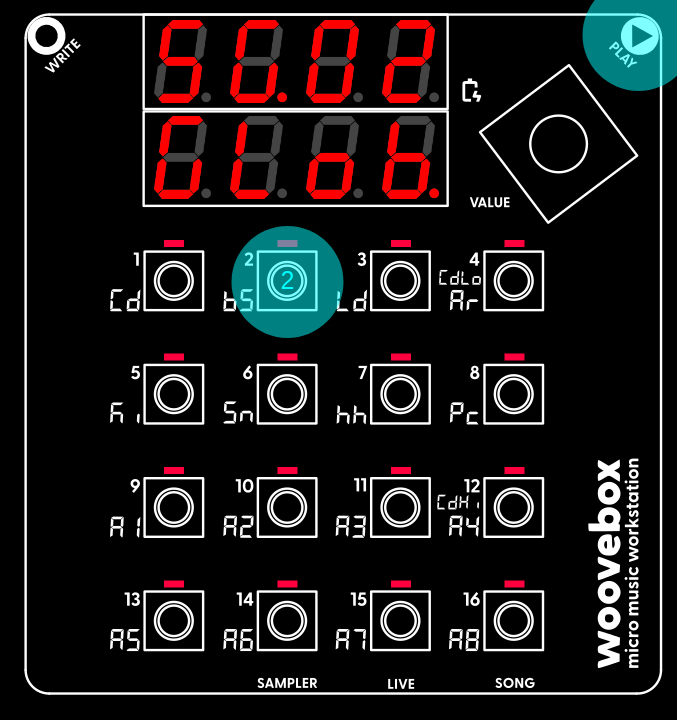
If you wish to select a different song to work on, you can do so by holding play and pressing 1-16 to select song 1 through 16.
If you wish to start over with the currently selected song by resetting and clearing it, you can do so through the context menu;
- Hold write and short-press the value knob to cycle through the options until you find the "Init rand" menu item.
- Once found, long-press ("long-pressing" meaning, holding down for more than one second) the value knob to action the item. The song will be cleared and your Woovebox will report "Init oK".
- Release write to exit the context menu.
- All patterns are cleared, and tracks are initialized with random (but typically appropriate) presets to get you started quickly.
Note that these context menus are available in a number of different places around the Woovebox UI, and they all work in the same way. Please take note of how to use them, as they often hide handy features, functions and short-cuts.
You may also be interested in...
- Deep. Not complicated.
Despite all its power, the UI is fast and the workflow simple.
- Restoring songs (under Wooveconnect)
Please also note that this restores only the song data and not any sample kits the song may use.
- 12. d.V.St Drone Pitch End (under DJ page)
Pitch of the drone (sine wave) tone at the end of the fragment in MIDI semitones.
- Song mode (under Full documentation, guide and tutorial)
"Song mode" allows you to create and arrange complete, complex songs, rather than just more basic individual patterns or loops.
- 8. L.1.ho hold duration for cutoff frequency LFO (under Amplitude page)
Specifies the hold duration in milliseconds for which the LFO should hold the LFO's sampled value.
- Full documentation, guide and tutorial
- Learning the Woovebox
- The very basics
- Quick start tutorial
- Tempo and BPM
- Tracks
- Patterns
- Live pattern recording
- Conditional triggering and modification
- Chords
- Arpeggios
- Scales and modes
- Genres
- Patches and Presets
- Sound design
- DNA dynamic patch cross-breeding
- Paraphonic parts
- Multi-instrument mode
- Risers, fallers, sweeps & ear candy
- Live mode
- Song mode
- Full song writing
- Sampler & vocoder
- Mixing & Mastering
- Lo-fi & vintage analog and digital emulation
- Randomization
- Hall effect sensor playing
- Advanced techniques
- Undo
- Boot modes
- Connecting other gear; MIDI, Sync, and audio pass-through
- Remote control expander mode
- Wireless MIDI over Bluetooth
- Connecting Bluetooth typing keyboard/touchpad
- Battery and charging
- Hardware quirks and limitations
- Understanding DSP load
- Looking after your Woovebox
- Firmware updates