- Full documentation, guide and tutorial
- Learning the Woovebox
- The very basics
- Quick start tutorial
- Tempo and BPM
- Tracks
- Patterns
- Live pattern recording
- Conditional triggering and modification
- Chords
- Arpeggios
- Scales and modes
- Genres
- Patches and Presets
- Sound design
- DNA dynamic patch cross-breeding
- Paraphonic parts
- Multi-instrument mode
- Risers, fallers, sweeps & ear candy
- Live mode
- Song mode
- Full song writing
- Sampler & vocoder
- Mixing & Mastering
- Lo-fi & vintage analog and digital emulation
- Randomization
- Hall effect sensor playing
- Advanced techniques
- Undo
- Boot modes
- Connecting other gear; MIDI, Sync, and audio pass-through
- Remote control expander mode
- Wireless MIDI over Bluetooth
- Connecting Bluetooth typing keyboard/touchpad
- Battery and charging
- Hardware quirks and limitations
- Understanding DSP load
- Looking after your Woovebox
- Firmware updates
- Quick start tutorial
- Set output volume
Set output volume
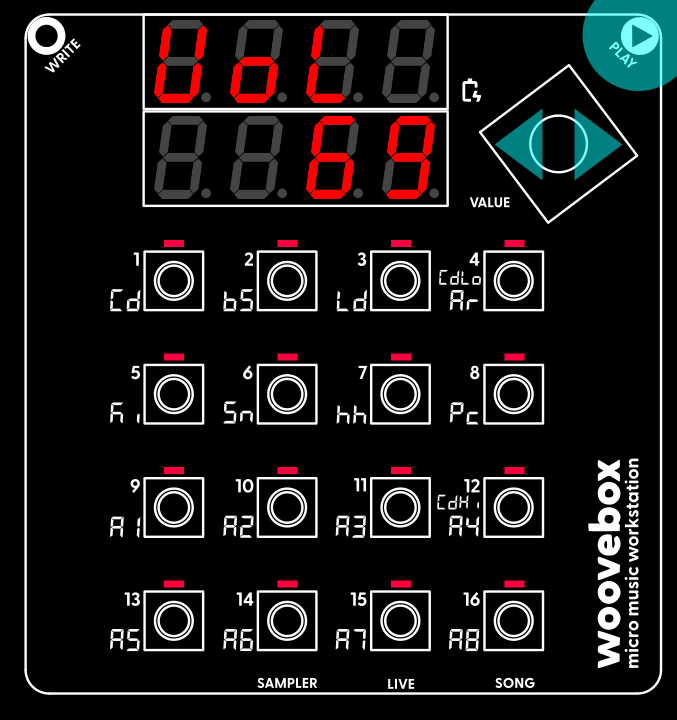
Hold Play and turn the Value knob to set the output volume to a comfortable level.
Hold play and turn the value knob left or right to set the output volume to a comfortable level. Press 1-16 to audition a sound to help you hear the difference in output levels. Your preferred output level will be saved on the next auto save event. You can adjust the output volume like this anywhere in the interface.
You may also be interested in...
- Method 2 (under Arpeggios)
If a sine wave is configured for the Pitch LFO with a depth of 2.0, the pitch will sweep the chord's note over two octaves.
- 2. LEvL oscillator output level (under Osc1 and Osc2 oscillator page)
- Beginners (under How to approach)
understanding how to manually build up a song in live mode by muting and unmuting different tracks.
- Learning the Woovebox (under Full documentation, guide and tutorial)
Learning how to operate the Woovebox is surprisingly easy, quick and intuitive.
- How to approach (under Learning the Woovebox)
- Full documentation, guide and tutorial
- Learning the Woovebox
- The very basics
- Quick start tutorial
- Tempo and BPM
- Tracks
- Patterns
- Live pattern recording
- Conditional triggering and modification
- Chords
- Arpeggios
- Scales and modes
- Genres
- Patches and Presets
- Sound design
- DNA dynamic patch cross-breeding
- Paraphonic parts
- Multi-instrument mode
- Risers, fallers, sweeps & ear candy
- Live mode
- Song mode
- Full song writing
- Sampler & vocoder
- Mixing & Mastering
- Lo-fi & vintage analog and digital emulation
- Randomization
- Hall effect sensor playing
- Advanced techniques
- Undo
- Boot modes
- Connecting other gear; MIDI, Sync, and audio pass-through
- Remote control expander mode
- Wireless MIDI over Bluetooth
- Connecting Bluetooth typing keyboard/touchpad
- Battery and charging
- Hardware quirks and limitations
- Understanding DSP load
- Looking after your Woovebox
- Firmware updates