- Full documentation, guide and tutorial
- Learning the Woovebox
- The very basics
- Quick start tutorial
- Tempo and BPM
- Tracks
- Patterns
- Live pattern recording
- Conditional triggering and modification
- Chords
- Arpeggios
- Scales and modes
- Genres
- Patches and Presets
- Sound design
- DNA dynamic patch cross-breeding
- Paraphonic parts
- Multi-instrument mode
- Risers, fallers, sweeps & ear candy
- Live mode
- Song mode
- Full song writing
- Sampler & vocoder
- Mixing & Mastering
- Lo-fi & vintage analog and digital emulation
- Randomization
- Hall effect sensor playing
- Advanced techniques
- Undo
- Boot modes
- Connecting other gear; MIDI, Sync, and audio pass-through
- Remote control expander mode
- Wireless MIDI over Bluetooth
- Connecting Bluetooth typing keyboard/touchpad
- Battery and charging
- Hardware quirks and limitations
- Understanding DSP load
- Looking after your Woovebox
- Firmware updates
- General workflow recommendation
- Harmonics
Harmonics
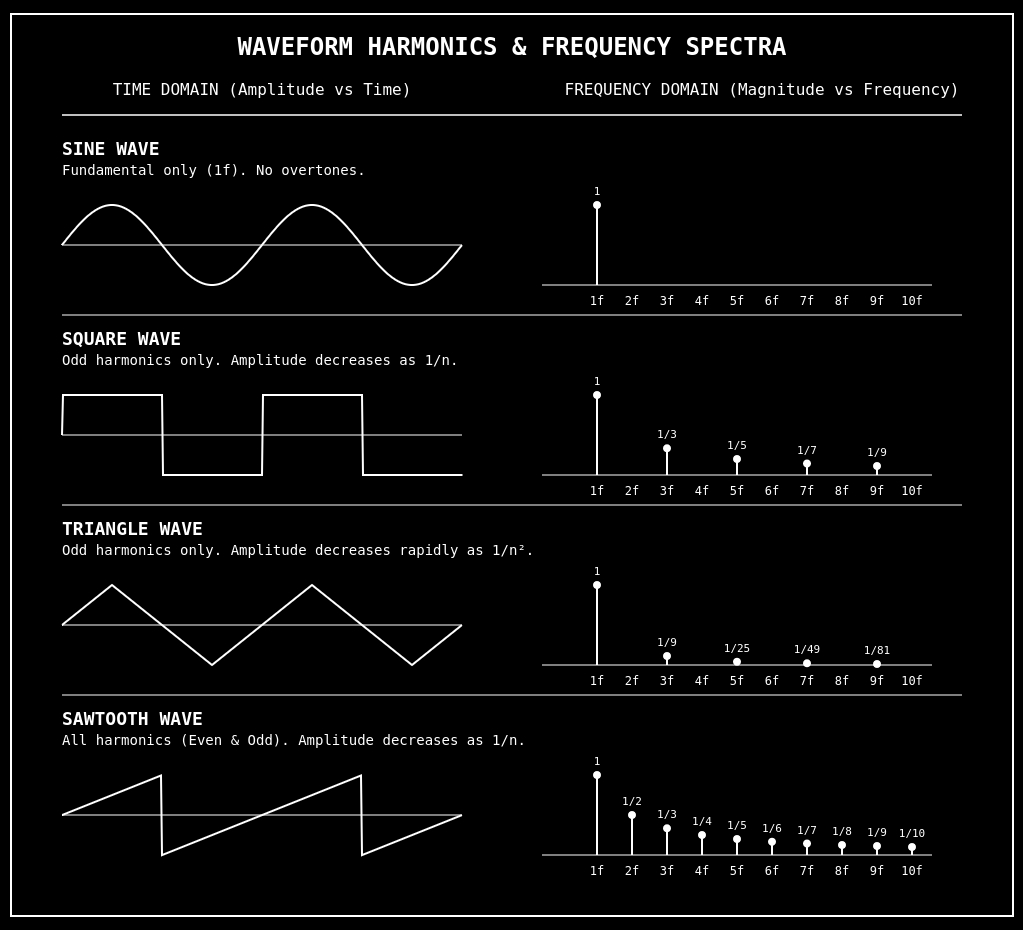
As most musicians know, a waveform is the shape of a vibration over time. The main vibration is called the fundamental, and it determines the basic pitch or frequency you hear.
Harmonics are extra vibrations riding on top of the main one at higher frequencies that are usually simple multiples of the fundamental. Even though they are quieter, they change the shape of the waveform and give the sound its unique character.
That is why different instruments can play the same musical note but still sound different. For example, a flute has fewer strong harmonics, so it sounds "smooth", while a distorted guitar has many strong harmonics, so it sounds bright and buzzy. Harmonics are basically the “extra ingredients” that color a sound or signal.
When mixing, this important knowledge can help you diagnose and clean up your mix. It, for example, explains why two saw waves are harder to mix - they "exist" all over the spectrum due to their harmonics. They contribute to "mud" way quicker. If you ever tried to mix a super saw (7 saws at once), you will know all about this.
Similarly, it also explains why sine waves are much easier to mix - the only harmonic is the fundamental at the exact frequency you play its note. It is therefore not a coincidence that the Woovebox' 3rd oscillator is a sine wave, as a sine wave can be surgically inserted to "beef up" a sound or fill a specific frequency without overpowering or affecting any of the other frequencies.
Of course, not all sounds are "neat" sines, squares, saws or triangles, with neatly isolated fundamentals but this should give you an idea of how sounds are built and how they occupy frequencies.
"The missing fundamental"
There is a neat psycho-accoustic trick/phenomenon called "the missing" fundamental. I turns out that you can create the suggestion of a sound by playing its harmonics but leaving out its fundamental. This trick is closely related to how bass frequencies can seemingly be played on tiny laptop speakers.
Producers of genres that rely on deep kicks and sub-bass should take note here. This trick provides a way to at least convey the "suggestion" of something happening at a frequency that a small speaker cannot reproduce.
On the Woovebox, the third oscillator (sine wave) can be configured to have its phase inverted so that when it is played together with, for example, a saw wave, the saw wave's fundamental is prefectly cancelled out by the inverted sinewave, recreating the "missing fundamental" effect.
You may also be interested in...
- Filter page (under Filters)
- Without conditional triggering (under Example)
- Use in Chiptune (under Method 2)
This allowed chiptune composers to create more complex and harmonically rich musical pieces within the limitations of the hardware.
- Advanced use and textures (under Method 2)
- EDM (under Genres)
Breaks / Drum & Bass; auto-slicing and time-stretching on the sampler make chopping and rearranging breakbeats fast.
- Full documentation, guide and tutorial
- Learning the Woovebox
- The very basics
- Quick start tutorial
- Tempo and BPM
- Tracks
- Patterns
- Live pattern recording
- Conditional triggering and modification
- Chords
- Arpeggios
- Scales and modes
- Genres
- Patches and Presets
- Sound design
- DNA dynamic patch cross-breeding
- Paraphonic parts
- Multi-instrument mode
- Risers, fallers, sweeps & ear candy
- Live mode
- Song mode
- Full song writing
- Sampler & vocoder
- Mixing & Mastering
- Lo-fi & vintage analog and digital emulation
- Randomization
- Hall effect sensor playing
- Advanced techniques
- Undo
- Boot modes
- Connecting other gear; MIDI, Sync, and audio pass-through
- Remote control expander mode
- Wireless MIDI over Bluetooth
- Connecting Bluetooth typing keyboard/touchpad
- Battery and charging
- Hardware quirks and limitations
- Understanding DSP load
- Looking after your Woovebox
- Firmware updates